First-Time Guild Setup
Setting up a regiment takes three steps: invite the bot, run one command, then fill in the rest on the web whenever you get to it. You'll need to be a Discord server Administrator to do any of this.
Step 1 — Add the Bot
Invite Clusterfox to your Discord server:

Nothing else to do here — the moment the bot joins, your regiment is registered automatically. No setup command required just to get that far.
Step 2 — Run /init
In any channel, run:
/init
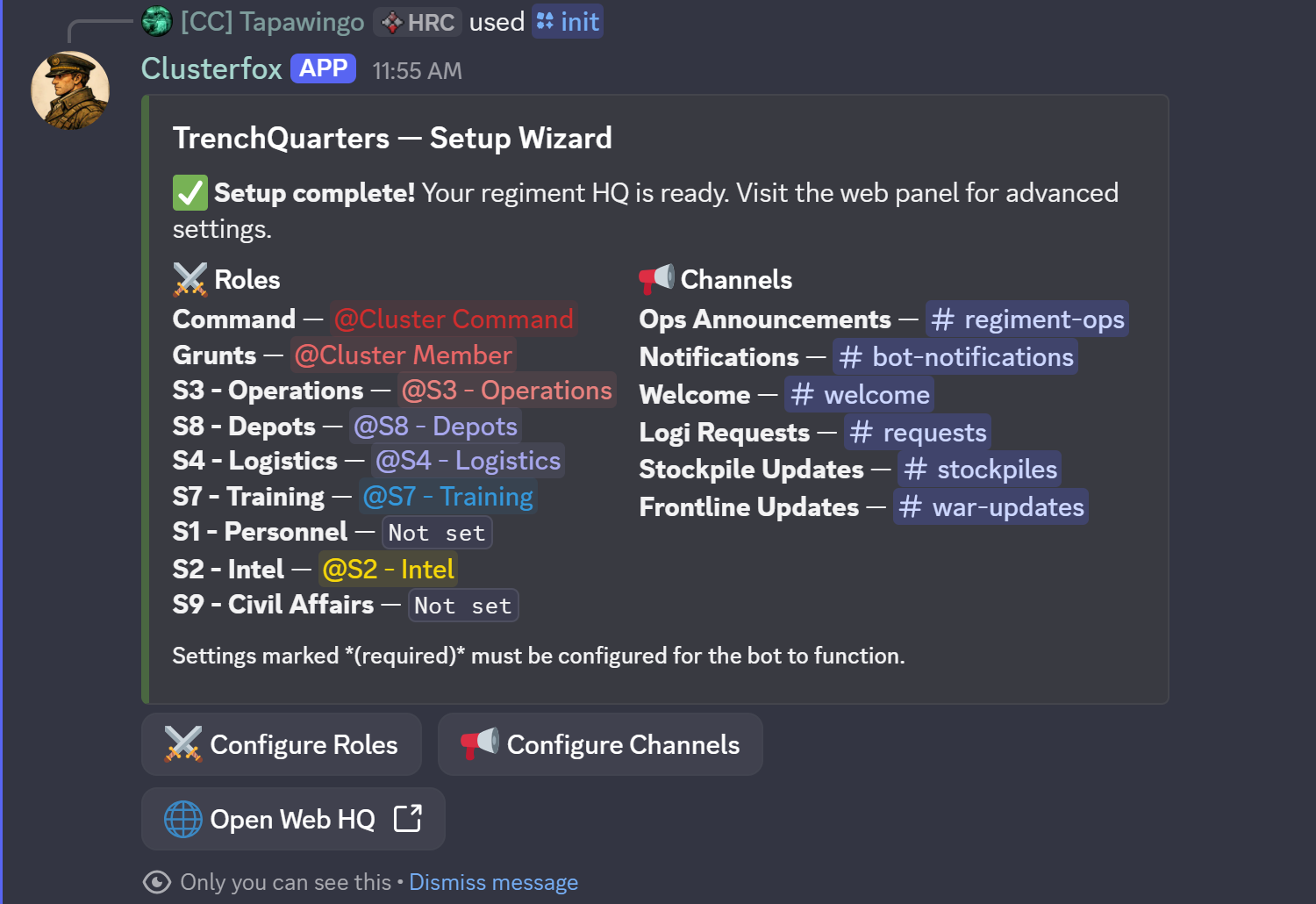
This opens a paginated setup wizard right in Discord. It covers two things:
- Roles — map your Discord roles to TrenchQuarters roles (table below)
- Channels — tell the bot where to post announcements, logi requests, stockpile updates, and more
Everything else — feature toggles, the welcome message, regiment branding — lives elsewhere: a few things via /config (next section), the rest on the web (Step 3).
Only four settings are actually required before the bot will function: the Command role, the Grunts role, the Ops Announcements channel, and the Notifications channel. The wizard's overview page tracks your progress and marks these (required); everything else can be filled in later or skipped entirely.
TrenchQuarters Roles
| Role | Access |
|---|---|
 Command Command |
Full administrative access to everything |
 S1 - Personnel S1 - Personnel |
Reserved — for the upcoming Rank & File features (member directory, rank tracking) |
 S2 - Intel S2 - Intel |
Verify or reject submitted intel reports |
 S3 - Operations S3 - Operations |
Plan and manage operations |
 S4 - Logistics S4 - Logistics |
Manage logistics requests and view stockpile codes |
 S7 - Training S7 - Training |
Run training events and qualifications |
 S8 - Depots S8 - Depots |
Full Supply & Stockpiles access — create, manage, and delete stockpiles |
 S9 - Civil Affairs S9 - Civil Affairs |
Reserved — for future recruitment features |
 Grunts Grunts |
Standard member access — view the Operations Room map, view Logistics, and read the Field Manual |
These aren't ranked tiers — apart from Command (full access to everything) and Grunts (the baseline every member gets), the staff roles don't outrank each other. S2, S3, S4, S7, and S8 each unlock their own area — Intel, Operations, Logistics, Training, and Depots — and a member can be given as many of them as apply, with none more "senior" than another. S1 and S9 are in the table for completeness, but there's nothing to map yet — they'll come online alongside the features they're reserved for. Each TrenchQuarters role maps to exactly one Discord role — but that Discord role can be reused across more than one TrenchQuarters role. A smaller regiment without a separate Discord role for every function might map both S4-Logistics and S7-Training to the same @Staff role, for example; it just can't go the other way and put two different Discord roles behind a single TrenchQuarters role.
Channels the bot can post to
| Channel | Used for | Required? |
|---|---|---|
| Ops Announcements | Warning Orders, Full Orders, operation updates | Yes |
| Notifications | Staff alerts (e.g. a signup with notes attached) | Yes |
| Welcome | New-member welcome message | No |
| Logi Requests | Logistics request embeds and claim tracking | No |
| Stockpile Updates | Stockpile threads, refresh reminders, low-stock alerts | No |
| Training Announcements | Training event posts | No |
| Frontline Updates | Live frontline map and casualty updates | No |
Quick edits without leaving Discord — /config
Once the basics are set up, /config is a faster way to tweak a handful of settings than opening the web dashboard. Run it the same way as /init, and it opens a small 4-page menu:
| Page | What you can change |
|---|---|
| Welcome | Turn the welcome message on/off, edit its title and description, send yourself a preview |
| Notifications | Toggle the "signup with notes" staff alert |
| Frontline Updates | Turn the feature on/off, set the daily newspaper post times and timezone |
| Anti-Spam Automod | Turn it on/off, and pick the mute role from a dropdown right on the page |
That's the full list — Operations, Intelligence, Training, Logistics, and Roster module toggles, plus auto-cleanup on war end, aren't available here and need the web (next section).
Step 3 — Configure on the Web
Log in to the web dashboard with your Discord account, then head to Admin. Everything /init and /config cover is editable here too, plus a few things that are web-only:
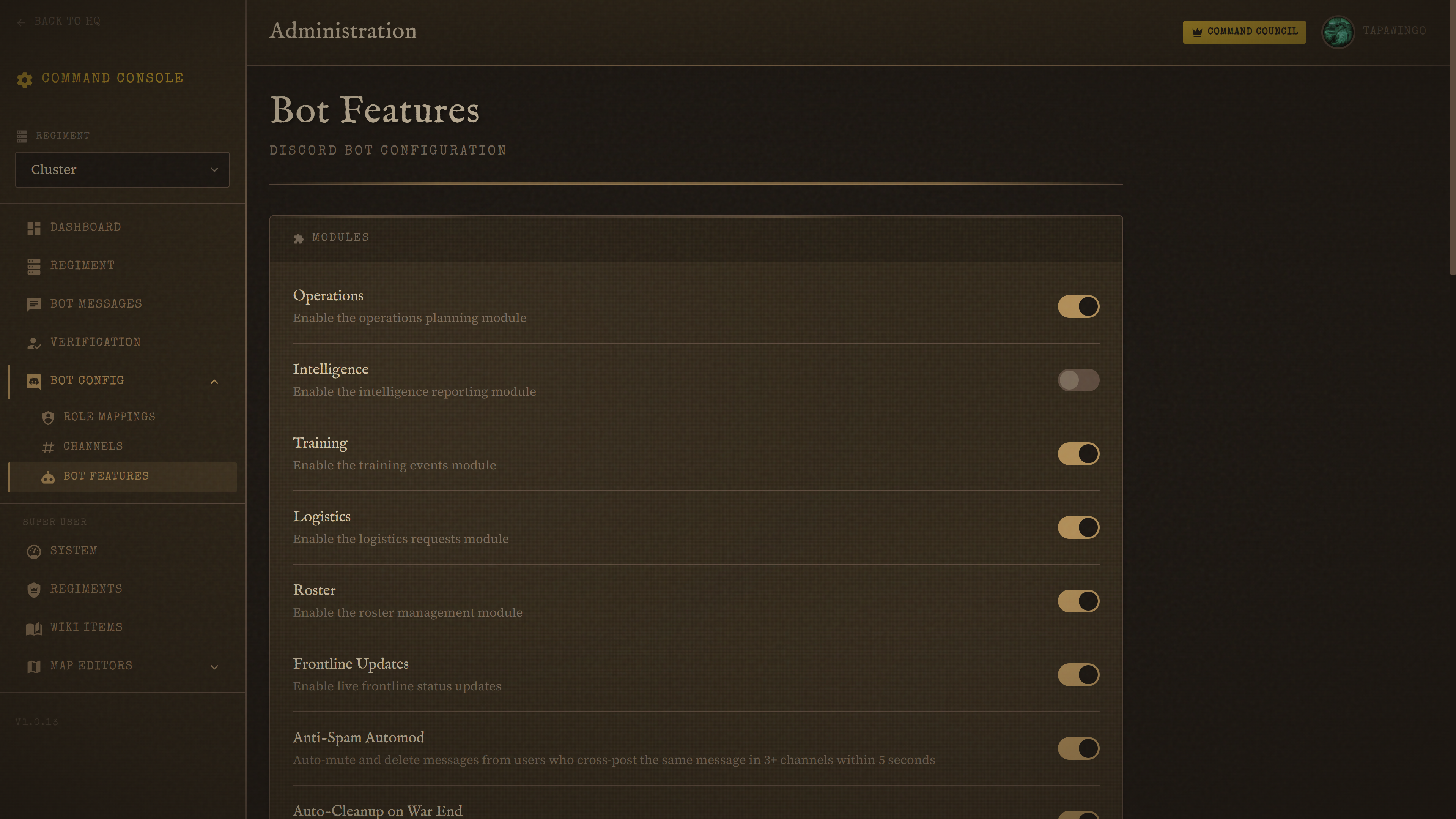
- Admin → Discord → Bot Features — turn whole modules on or off (Operations, Intelligence, Training, Logistics, Roster, Frontline Updates, Anti-Spam, auto-cleanup on war end), set up the welcome message embed, and configure staff notifications
- Admin → Verification — build your recruit application flow: custom questions, review process, and which role gets auto-assigned on acceptance
- Admin → Bot Messages — write persistent embeds or messages that Clusterfox posts and keeps up to date in any channel
- Admin → Regiment — set your regiment's name, description, insignia, team (Colonials/Wardens/unassigned), and war shard
After Setup
New here and already have members in your server? Run /sync all once to pull them all in:
/sync all
This creates a record for every current member. After that, a background sync keeps everyone up to date automatically, once an hour — you don't need to run it again unless something looks out of sync.